Volume 33: Build Smaller Than the Hype
Every morning, an AI agent I built scans thirteen news sources, summarizes what matters, and lands in my inbox before coffee. Less than ten dollars a month to run. The version of agent most professionals will actually build looks nothing like the headlines.
🧭 Founder's Corner: Why the headline-grabbing version of "AI agent" is not the one you should build, and how to build the version that actually gives you time back.
🧠 AI Education: How Copilot's agentic layer actually works, and which of its four pieces is the right starting point for the recurring work in your week.
✅ 10-Minute Win: Audit your LinkedIn profile against where you want to go in 24 months, then rewrite it with a soft-launch post for your network.
Let's jump in.
Enjoying the weekly content? Forward this volume to a colleague, friend, or family member to subscribe.
Signals Over Noise
We scan the noise so you don’t have to — top 5 stories to keep you sharp
1) White House Considers AI Vetting Order Modeled on FDA Drug Approval
Summary: NEC Director Kevin Hassett said on May 7 that the White House is drafting an executive order requiring AI models to clear a federal safety review before public release, modeled on FDA drug approval. The proposal is a response to Anthropic's Mythos cybersecurity model and would task the NSA, the National Cyber Director, and the director of national intelligence with vetting frontier AI.
Why it matters: A clear break from the administration's 2025 deregulatory posture. The FDA framing alone changes how CISOs and compliance officers should think about which models their organization can adopt next year.
2) OpenAI Releases Healthcare AI Policy Blueprint
Summary: OpenAI published a healthcare policy blueprint titled "Keeping Patients First" calling for broader patient data portability, expanded clinician use of AI for documentation and summarization, new state-level regulatory sandboxes for testing AI care models, and FDA modernization for AI-enabled medical software. The document includes case studies from AdventHealth and pushes for stronger enforcement of federal information-blocking rules.
Why it matters: AI companies are no longer just building healthcare tools, they are writing the rules those tools will operate under. Each ask removes a specific constraint between a generalist AI assistant and a patient or clinician using it for care. Read vendor policy proposals as carefully as contracts.
3) Anthropic Signs Deal With SpaceX to Use All of Colossus 1 Data Center Capacity
Summary: Anthropic announced on May 6 a deal to use SpaceX's entire Colossus 1 data center in Memphis, gaining 300+ megawatts and 220,000+ Nvidia GPUs within a month. The deal doubles Claude Code rate limits and removes peak-hour restrictions for Pro and Max subscribers.
Why it matters: Two rivals who openly dislike each other are now sharing infrastructure because nobody can build chips fast enough. Compute is the new oil, and labs securing it across multiple providers are the ones whose tools will keep working when demand spikes.
4) Google, Microsoft, and xAI Will Let the U.S. Government Test Their AI Models Before Launch
Summary: The Commerce Department's Center for AI Standards and Innovation (CAISI) announced on May 5 that Google, Microsoft, and xAI will share unreleased AI models with the federal government for pre-deployment evaluation. The agreements build on existing CAISI work with OpenAI and Anthropic, which has already produced 40+ model evaluations.
Why it matters: The soft version of the FDA-style review also being debated this week. The federal government is quietly building the infrastructure of an AI regulatory state, one voluntary agreement at a time.
5) Wall Street Sees 'Changing of the Guard in AI' as Intel, AMD Shares Soar While Nvidia Lags
Summary: CNBC reported on May 8 that the AI hardware trade is broadening fast: AMD and Intel up ~25% this week, Micron up 37%, Corning up 18%. All four have more than doubled this year while Nvidia is only 15% ahead. AMD's CEO Lisa Su raised expected server CPU growth to 35% over the next three to five years, citing AI agents as the demand driver.
Why it matters: For a year, "the AI trade" basically meant Nvidia. That framing just broke. The AI economy is broadening into memory, CPUs, glass, and networking, and "I'll just buy the big AI name" stopped being a strategy this week.
Missed a previous newsletter? No worries, you can find them on the Archive page.
Founder's Corner
The Agent That Reads the Internet for Me Every Morning
Every morning, before my first sip of coffee, an AI research rundown is waiting in my inbox. Thirteen news sources scanned overnight. The most important signals prioritized, summarized, and personalized to help find topics for the Founder's Corner articles. I built the agent that runs the whole thing, despite never having used a single tool in the tech stack.
The version of "AI agent" dominating headlines is autonomous, multi-step, and sometimes unsettling. The version sitting in my inbox is none of those things. Less than ten dollars a month to run. Hours of manual research given back to me every week. And along the way, it taught me something more useful than anything you will read in the agent hype cycle. Agents live on a spectrum, not inside a headline.
The Headline Version Is Not the Only Version
The autonomous, multi-step, headline-grabbing version is real. It writes codebases without supervision, orchestrates workflows across enterprise tools, and operates without human approval at every step. It is also the loudest one. The version most professionals will actually build looks nothing like it.
NVIDIA's State of AI Report 2026 found that 44% of companies were either deploying or assessing AI agents in 2025. Telecommunications led adoption at 48%. Retail and consumer packaged goods followed at 47%. It is clear that momentum around agents is picking up, but that momentum comes with friction.
KPMG's Q4 2025 AI Quarterly Pulse Survey shows agent deployment at 26%, down from 42% the previous quarter. KPMG frames this as professionalization, with leaders consolidating to fewer, more rigorous deployments. Look at it as a builder and a different story emerges. Real adoption never moves in a straight line.
All of that matters to enterprise leaders building autonomous systems at scale. It does not have to matter to you. The simpler end of the spectrum is ready right now, while your company is still working through governance reviews and integration roadmaps. You can build an agent to help with your everyday work in parallel, without waiting for the enterprise version to arrive.
Proof on the Other Side of the Discomfort
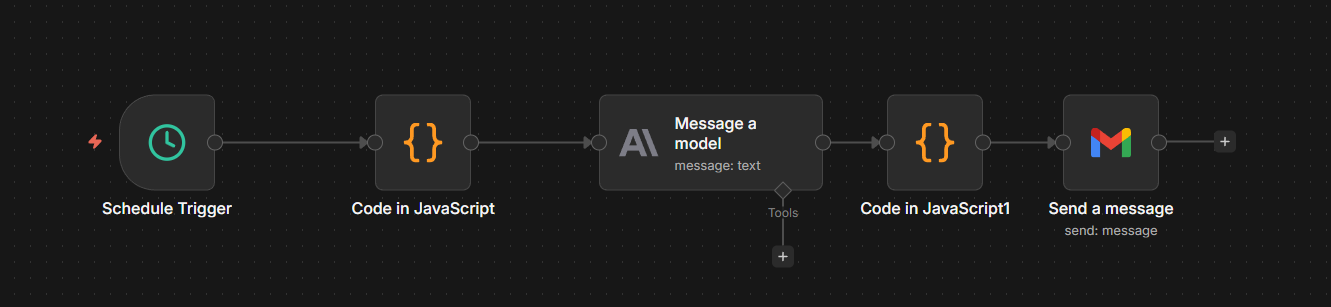
I had zero hands-on experience with the tech stack going into the build. Railway. n8n. Postgres. The Anthropic API. RSS feed configuration. OAuth setup. Nothing but an idea and my AI assistant.
The problem was specific to me, yet relatable to what many professionals struggle with: not enough time in the day. I needed topics for Founder's Corner every week, and finding them through manual searches and scattered tabs was cumbersome. And there was the risk of missing out on something important or relevant to a theme I had been working through. Healthcare technology news was moving fast, and AI news was moving even faster. I did not have a workflow built to keep up with either, and I was missing important signals that could help shape my next article.
I needed a system that scanned trusted sources, surfaced what mattered, and delivered the signals before I had to go looking for them. This was my second agent system. The first one was a thinking partner I had to engage every week. This one is a quiet worker that delivers before I am awake.
The process started the same way most of my AI work starts. I told Claude the problem, then let Claude interview me until the details I had not put into words came out: source list, frequency, output format, what success looked like. From that conversation Claude produced the architecture and an implementation plan, and we started building. The agent itself came together quickly. The infrastructure did not. Permission errors on the database, a trailing slash that broke an OAuth handshake, and environment variables in the wrong service that wiped the deployment every time it redeployed. Each problem was solvable, but none of them were the agent. They were the plumbing the agent needed to exist. That gap, between the agent and its plumbing, is the same gap enterprises are running into at scale. The complexity is not in the agents. It is in the systems they depend on.
My build followed the same arc. The first hour was uncomfortable. I did not understand what half the screens were asking me to do. By the second hour the pieces started connecting. By the third, I had something running on its own, doing work I used to do manually. The barrier is not intelligence or technical skill. It is the willingness to sit with discomfort long enough for the pieces to click. Self doubt is the only thing standing between you and an agent that gives you time back.
Sitting with the unknown is uncomfortable. It is also where the real progress happens. Every morning at 7 AM, my agent wakes up and gets to work.
It pulls the latest articles from thirteen trusted sources in AI and healthcare technology. It filters for anything published in the last twenty-four hours and sends the full set to Claude through the API. Claude reads every article, picks the five to seven topics most relevant to what I write about, and writes a two to three sentence brief on why each one matters. The whole digest lands in my inbox, formatted and ready, before I have brewed a pot of coffee.
The spectrum is not just a way to think about agents. It is permission to build something smaller than the hype and still call it real.
Where the Wave Is Going
The agents most people will build are not the ones making headlines. They are the ones making mornings easier, weeks shorter, and recurring problems disappear. GitHub's Octoverse 2025 report found that nearly 80% of new developers there use GitHub Copilot, an AI coding assistant, within their first week. AI is no longer the advanced tool. It is the default one. The professionals who will benefit most from this shift are the ones who stop waiting for permission to participate.
Pick a recurring problem in your week. Pair with AI as your build partner. The version that solves your problem matters more than the one trending on social media. The right agent for you may not be impressive enough to demo. It will be useful enough to keep. Go build it.
Share Neural Gains Weekly with your network to help grow our community of ‘AI doers’. You can also contact me directly at admin@mindovermoney.ai or connect with me on LinkedIn.
AI Education for You
Copilot 101 - Part 5: Researcher, Analyst, and Agents: Copilot's Agentic Layer
What Is Actually Going On Here
Dana types a question into the Microsoft 365 Copilot app and selects the Researcher agent. She wants a competitive scan of three vendors pitching AI-powered scheduling tools to her health system. She hits send and waits. What happens next is not a single call to a language model. The Researcher agent decomposes her question into sub-questions, plans a sequence of searches across her organization's emails and files plus the public web, evaluates what it finds, decides what is missing, runs more searches, and assembles a structured report with citations she can verify. Several minutes pass. She gets back work that would have taken her hours.
The Problem That Made This Necessary
The standard Copilot experience inside Outlook, Word, or Teams is fast and shallow by design. You ask one question, Copilot pulls relevant context, the model generates one response, and you move on. That works for summarizing an email or rewriting a paragraph (Vol 31). It collapses the moment the work requires reasoning across multiple sources, taking intermediate steps, or running actual analysis on real data.
Knowledge workers have been filling that gap manually for years. Pull data from a system, paste it into Excel, build a pivot, screenshot it, write a summary, send it. Or open a browser, run six searches, skim ten tabs, take notes, draft a memo. The bottleneck is not the thinking. It is the assembly. Microsoft's design challenge was to build agents that could do the assembly work without losing accuracy or transparency, and to do it inside the same product surface where the rest of the work already lives. The result is the agentic layer covered in this volume.
How It Actually Works
Four components define Copilot's agentic layer in May 2026.
Researcher is an agent built for multi-step research. When you submit a query, Researcher plans a research approach, pulls from your work data (emails, files, meetings, chats you have permission to see) and the public web, and produces a structured report with cited sources. It can ask clarifying questions before it runs. It deliberately takes longer than a standard Copilot chat because it is doing more work. Microsoft has also added support for Anthropic's Claude model in Researcher, which administrators can enable in the admin center.
Analyst is the data analysis equivalent. Where Researcher pulls and synthesizes information, Analyst takes raw data files (Excel spreadsheets, CSV files, databases) and reasons through them. Ask it a question about your data and it calculates statistics, identifies trends, surfaces outliers, and returns a report with charts and tables. It is built for users who are not data analysts but need data analysis.
Both Researcher and Analyst live under the Agents menu in the Microsoft 365 Copilot app and require a Microsoft 365 Copilot license or eligible Premium subscription. Availability of specific features depends on your organization's admin configuration.
Agentic capabilities in Word, Excel, and PowerPoint are the third piece. Microsoft moved these to general availability on April 22, 2026. Where Researcher and Analyst run in the chat surface, this layer runs inside your file. Same agentic principle (multi-step actions, taking work directly on the canvas), different deployment. Vol 32 covered the user-facing implications.
Agent Builder is the fourth piece, and the most accessible one. It lives directly inside the Microsoft 365 Copilot app and is included with a Copilot license. It is the closest functional equivalent in the Microsoft ecosystem to ChatGPT's custom GPTs. You describe in natural language what you want the agent to do, point it at the knowledge sources you want it to use (SharePoint files, public websites, and with a Copilot license, your Teams chats and Outlook emails), and it becomes a reusable agent pinned in your Copilot app.
The important constraint: Agent Builder agents are prompt-based, not automated. You build the agent once, then invoke it whenever you need it. It does not run on a schedule. It does not trigger autonomously. It cannot take actions in external systems. Each time you want output, you open the agent and ask it to act. The architecture is the same agent framework covered in Vol 26: instructions, knowledge sources, and a defined workflow. Deployed at personal or small team scale.
Where It Still Breaks
Researcher reports look authoritative because of the formatting, headings, and citations. That makes the citation check more important, not less. Sources can be misread, dated, or weighted incorrectly even when the citations themselves are accurate. Microsoft says clearly: always review what the agent generated before acting on it.
Analyst is only as good as the data structure underneath it. Messy, unstructured spreadsheets produce messy, unreliable analysis. Time spent cleaning data before invoking the agent saves more time than the agent saves on the analysis itself.
Agent Builder is built for the workflows it is designed to handle and not the ones it is not. It holds instructions and knowledge sources, but it does not run multi-step automated workflows or take actions inside external systems. For workflows that require automation, scheduled execution, or external integrations, an organization needs Copilot Studio, which sits with IT and is not deployed at the individual user level.
Across all four components, admin configuration matters. Your IT team controls which agents are enabled, which models are available, and which knowledge sources can be connected. If something described here is not visible in your Copilot app, it is most likely an admin setting, not a missing feature.
What This Means for How You Work With It
Use Researcher for work that justifies the longer response time, not for questions a fast Copilot prompt would have answered. Match the tool to the task.
Use Analyst when the value is in the analysis, not in a quick data summary. Clean your data first. Read the report critically before you act on it.
Treat the in-app agentic capabilities in Word, Excel, and PowerPoint as the default mode for any file work that takes more than one round of changes. Single-prompt Copilot is fine for short tasks.
If you have a recurring workflow that you handle the same way every week (meeting prep, weekly reporting, vendor research, candidate screening), Agent Builder is where you ask whether a personal agent would replace twenty minutes of manual assembly each time. Build it for yourself. See if you actually use it. Remember that you will still need to invoke the agent each time. The value is consistency, not autonomy.
How This Connects
The AI Agents series (Vol 24-27) built the conceptual framework: action loops, reasoning patterns, memory, tools, and multi-agent systems. This volume shows that framework deployed inside a live enterprise product. Researcher is an agent with planning and tool use. Analyst is an agent that reasons over data. The in-app agentic capabilities are agents acting on your file. Agent Builder is the surface where you build your own. Every piece traces back to a concept the curriculum has already covered.
Vol 34 closes the Copilot Deep Dive series with a framework for evaluating whether Copilot is delivering value in your specific role. After six volumes of capability, the question becomes: where is this saving you time, where is it creating extra work, and how do you tell the difference?
Part 5 of 6 in the Copilot Deep Dive series.
Your 10-Minute Win
A step-by-step workflow you can use immediately
The LinkedIn Audit
Most LinkedIn profiles look backward at what someone has done instead of forward at what they are building toward. This workflow audits the gap between where your profile says you are and where you want to go, then rewrites with that target in mind, going further than LinkedIn's own AI rewriter.
The Workflow
1. Gather Your Inputs (1 Minute)
Open Claude, ChatGPT, or Gemini. Have ready: your current headline, your current About section (copy-pasted from your profile), one sentence on where you want to go in the next 12 to 24 months, and 2 to 3 specific wins from your recent work with numbers attached if possible.
2. Run the Positioning Audit (3 Minutes)
Paste the prompt below. This is the diagnostic step before any rewriting.
Copy/Paste Prompt: "You are an expert LinkedIn strategist who has helped hundreds of professionals reposition their profiles for career pivots. I want you to audit my current profile before rewriting anything.
Here is my information:
Current headline: [paste current headline]
Current About section: [paste current About section]
Where I want to go in the next 12 to 24 months: [target role, industry, or positioning]
Two or three recent wins with results: [win 1 with numbers], [win 2], [win 3]
Audit my current profile against where I want to go. Tell me:
- What my current profile is signaling to recruiters and connections (the story it is telling today).
- The three biggest gaps between my current positioning and my target positioning.
- What is missing entirely that would make a recruiter for my target role pay attention.
Be specific and direct. If something is generic or buzzword-heavy, say so."
3. Generate the New Headline and About (4 Minutes)
Read the audit out loud. Then send the follow-up prompt below in the same chat to act on it.
Copy/Paste Prompt: "Based on the audit above, rewrite my LinkedIn profile in two parts.
Part 1: Three headline options. Each under 220 characters, anchored in my target positioning, and front-loading the result or expertise that matters most for where I want to go. No buzzwords like 'passionate,' 'driven,' or 'results-oriented.'
Part 2: A new About section in 4 paragraphs:
- Opening hook: who I am and what I am building toward (2 sentences).
- Core expertise: 3 to 4 sentences connecting my background to my target direction, with one specific proof point.
- What I do best: a tight list of 3 to 5 skill or capability statements in plain language.
- Closing CTA: how someone should reach out and what kinds of conversations I am open to.
Voice: confident, specific, no hype. Sound like a real person, not a press release."
4. Deploy the Rewrite and Soft Launch the Pivot (2 Minutes)
Paste your new headline and About into LinkedIn (Profile, then Edit). Then run the prompt below to generate a casual update post that signals the new direction to your network.
Copy/Paste Prompt: "Now write a casual LinkedIn post I can publish this week that softly announces my new direction without sounding like a press release. Format it as 4 to 6 short lines with line breaks between them. Open with a real moment or observation, not a humble brag. End with one question that invites comments. Under 150 words. No hashtags in the body, only at the very end. Voice: like I am talking to a colleague over coffee, not pitching to a stage."
Schedule the post for tomorrow morning. Your profile is now forward-facing, and your network knows where to send opportunities.
The Payoff
You just turned a stale profile into a forward-facing positioning statement, with a soft launch post that signals the pivot to your network. More importantly, you used a 3-step workflow (audit, rewrite, announce) instead of a one-shot rewrite prompt. The audit step is what separates a thoughtful repositioning from generic AI buzzword soup.
🧠 The AI Concept You Just Used
Persona-aware rewriting and positioning strategy. When you give an AI your current state, your target state, and concrete proof points, it can rewrite content with intent toward where you are going, not just polish where you have been. That is what makes AI rewriting useful for career work, not just grammar smoothing.
Transparency & Notes
- Tools used: Claude (claude.ai), ChatGPT (chatgpt.com), or Gemini (gemini.google.com). All free tier. Microsoft Copilot also handles this workflow if you have been following our Deep Dive series.
- Privacy: Keep the names of past employers, current colleagues, and anyone tied to your wins generic when prompting. "My company" or "a Fortune 500 client" works better than the actual name.