Volume 24: Stop Starting From Zero
Hey everyone!
Every time you open a new chat, your AI forgets everything. Your preferences, your projects, your goals, your voice. You are not picking up where you left off. You are starting a new relationship from scratch, every single time.
Most professionals do not realize there is a better way built right into the tools they already use.
🧭 Founder's Corner: Why AI Projects mode is the most underused feature in the toolkit, and what happened when I finally built my entire workflow inside one.
🧠 AI Education: The AI Agents series begins with the one distinction that changes how you think about every tool you use: agents act, chatbots respond.
✅ 10-Minute Win: Turn a paragraph of confusing jargon into plain English and a personal glossary you can build on forever, in under 10 minutes.
Let's get into it.
Missed a previous newsletter? No worries, you can find them on the Archive page.
Signals Over Noise
We scan the noise so you don’t have to — top 5 stories to keep you sharp
1) Introducing GPT-5.4
Summary: OpenAI released GPT-5.4 in ChatGPT, the API, and Codex, plus a higher-performance GPT-5.4 Pro tier for more complex work.
Why it matters: Frontier model upgrades quickly cascade into everyday tools—better reasoning, stronger coding, and more capable “agent” workflows show up immediately in products people actually use.
2) Anthropic CEO says Pentagon ban less harsh than Hegseth had threatened
Summary: Anthropic’s CEO says the Pentagon’s “supply chain risk” designation is narrower than earlier threats, but the company still plans to sue to overturn it. The piece lays out what the designation does (and doesn’t) restrict, and why experts think the move may not hold up in court.
Why it matters: This is AI governance in the real world: contract language and procurement pressure can shape what models are allowed to do as much as regulation does.
3) NVIDIA Announces Strategic Partnership With Lumentum to Develop State-of-the-Art Optics Technology
Summary: NVIDIA announced multiyear agreements with Lumentum and said it will invest $2B to expand capacity and R&D for optics used in AI data centers (moving data faster and more efficiently inside massive clusters).
Why it matters: The AI race is increasingly limited by infrastructure—not just GPUs, but the networking/optics that let data centers scale without choking on bandwidth and power.
4) Nvidia CEO Jensen Huang says that OpenClaw is the “single most important software release probably ever”
Summary: OfficeChai reports Jensen Huang praised “OpenClaw” and framed it as a shift from AI that answers questions to AI that performs actions (agent-style work), arguing it massively increases compute demand.
Why it matters: Even if you ignore the hype, the “agents = way more compute” argument is a key trend: action-taking AI can multiply infrastructure needs and accelerate the data-center arms race.
5) Labor market impacts of AI: A new measure and early evidence
Summary: Anthropic published a research report proposing a method to measure early labor-market impact from AI, aiming to move beyond anecdotes with more systematic evidence.
Why it matters: The job-impact conversation is noisy; better measurement helps people and policymakers track where change is actually happening first (tasks, roles, hiring patterns) and respond faster.
Founder's Corner
The Most Important AI Feature You're Not Using
Value is driven through tribal knowledge, and it is often impossible to pass along to others. You are working with a new technology that demands great inputs to drive results. But the knowledge it needs lives in your head, scattered across documents, past conversations, and muscle memory built over years.
You experiment with AI tools, explore use cases, and open new chats. Each one starts from zero. You are experimenting across standalone interactions instead of building something progressive. Efficiency is lost. Momentum stalls. Eventually, you close the tab and tell yourself AI just doesn't work the way you expected.
Searching Without A Strategy
Most professionals use AI the same way they use a search engine. They have a question, they open a chat, they get an answer, they move on. It works well enough that they keep doing it. But there is a meaningful difference between answering a question and solving a problem. Questions are transactional. Problems are progressive. They build on each other, require context, and compound over time. When you treat every chat as a standalone interaction instead of a chapter in a larger story, you are resetting that progress every single time.
A recent Gallup poll from Q4 2025 found that nearly half of U.S. workers never use AI in their role at all. Of those who do, only 27% of white-collar workers use it at least a few times a week. The tools are available. The gap is not access. It is approach.
I ran into this same wall. Not because the tools were failing me, but because I didn't know what I was missing. It turns out the solution was already built. Most people just never find it.
The Workspace You're Not Using
Creating newsletter content requires time, energy, and most importantly, context. I'm continuously looking for ways to evolve my voice and deliver information that will help people on their AI journey. I'm consistently providing feedback to my AI that leads to better prompts, sharper writing, and focused content roadmaps. But my work lives in a centralized hub, regardless of the model used to execute a task.
Every major AI platform has a version of this: a dedicated workspace where your files, instructions, and chat history live together under one roof. Instead of starting every conversation from scratch, the model already knows your context, your preferences, and your goals. Think of it as the difference between briefing a new consultant every single week versus working with someone who has been embedded in your business for months. The knowledge compounds. The outputs improve. The time you spend re-explaining drops to zero.
Every AI model calls it something different, but the core idea is the same: context, productivity, and strategy in one place.
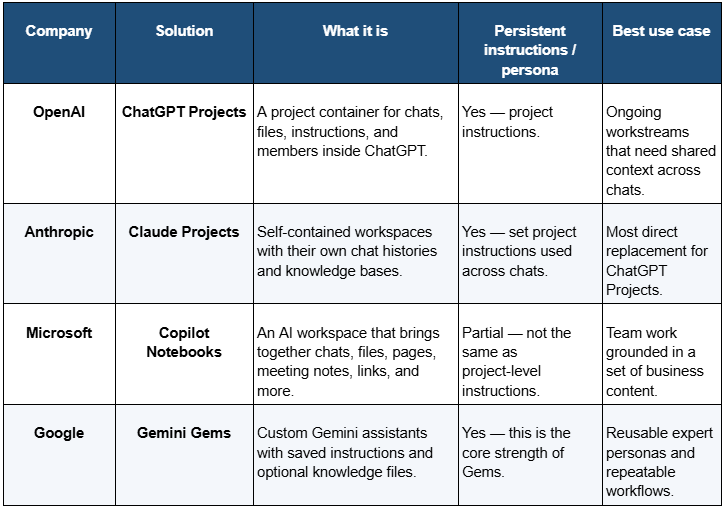
I've been using project features since day one, and it changed how I think about AI entirely.
What I Learned the Hard Way So You Don't Have To
There is only so much time in a day, which is why I try to use AI as a strategic partner and not just a search engine. Implementing my workflows into Projects across multiple platforms taught me valuable lessons that serve as a foundation for every AI interaction I curate.
Tip 1: Transfer your Knowledge
The single biggest benefit of Projects mode is to ground all knowledge in one place. This means linking documents that will help teach the AI, adding standard operating procedures that show how the work is completed, and building instructions that create structure to every chat initiated within the Project. If a standard LLM chat is trained on the entirety of the internet, then think about your Project as training that same LLM only on the context you provide. You are creating a narrow and focused AI assistant that can work alongside you to solve specific problems that only exist in your created universe.
Tip 2: Take Advantage of Memory
AI doesn't just need to be smart, it needs to remember what matters. VentureBeat published in January 2026 that contextual memory will become "table stakes" for enterprise AI deployments this year. This means the AI remembers the decision you made in Tuesday's chat when you open a new one on Friday. I experienced this firsthand when an AI I was working with flagged that the context window was approaching its limit and generated a handover document unprompted, capturing everything needed to pick up exactly where we left off in a new chat. That moment reframed how I think about AI entirely. Think of a Project as giving your AI the full context from your previous conversations, stored and accessible across every chat in the project. You no longer have to repeat instructions or reexplain strategy in a new chat session. I run six content chats every week, each building a different section of my newsletter, all grounded in the same tone, voice, and strategy. That type of symmetry is hard to replicate and a powerful shift in how to think about using AI.
Tip 3: Continuously Improve Your Workflows
This manifested in several ways during my journey with Projects. First, I'm constantly updating prompts and having AI save the changes to memory. This allows me to use real time feedback and adjust prompts with the goal of improving the next output. I also outsource 99% of the project management work directly to AI. This would not be possible without the AI committing context to memory. I have full project plans created with simple prompts, living documents that stay with me regardless of what model I use to execute a task, and placeholders for ideas that are not fully baked yet. I'm able to spend less time tracking and more time executing.
Now What?
Most professionals will read this and nod. A smaller group will open their AI platform, find the Projects feature, and actually build something. That gap is not about access or intelligence. It is about approach.
The professionals who compound their AI skills fastest are not the ones using the newest models. They are the ones who treat every interaction as part of a larger system. They transfer their knowledge, build on it session after session, and continuously refine how they work. The tool gets smarter because they get more intentional.
You already have access to everything described in this post. The workspace exists. The memory features are live. The only thing missing is a problem worth solving and the decision to start. Pick one. Build a Project around it. Give your AI the context it needs to actually help you. Then come back next week and share what happened.
AI Education for You
AI Agents, Part 1 - What is an AI Agent?
For the past several months, this newsletter has been building the foundation: how models learn, how they process language, how they retrieve information, how they generate responses. That foundation was not background material. It was preparation for this.
AI agents are where everything converges — and where the professional stakes get real. Every major AI platform is racing to ship agentic capabilities — OpenAI has Operator, Google has Agentspace, Microsoft is embedding agents across the Copilot suite, and Anthropic has wired Claude directly into external tools and workflows. Every enterprise software vendor is attaching the word "agent" to products that may or may not deserve it. And most professionals encountering this shift have no framework for evaluating what is actually different, what is marketing language, and what it means for how they work.
I started seeing it firsthand when I began building my own newsletter workflow inside Claude Projects — what felt like a smarter chat tool turned out to be something closer to a system that remembers, retrieves, and acts. That shift is what made this series necessary.
Over the next four volumes, you will build that framework from the ground up. Not by reading a feature list, but by understanding how agents actually work — the decision loop, the memory architecture, the tools, and what happens when you hand one a real task. By Vol 27, you will have watched a complete professional scenario play out start to finish, including where agents struggle and what that means for how you use them.
The Assumption
Most professionals assume an AI agent is a more capable chatbot. It answers faster, handles more complex questions, maybe searches the web while it responds. Under this model, the gap between a standard AI chat tool and "an AI agent" is a matter of degree — more powerful, more impressive, but the same kind of thing. You prompt it. It responds.
That assumption is completely reasonable. Every AI tool covered in this newsletter operates on the same basic mechanic: input in, output out. One turn. One response. The pattern is consistent enough that extending it to agents feels like the obvious conclusion.
Where It Breaks Down
A strategy analyst needs a competitive briefing on three rival companies before Friday's leadership meeting. She opens her AI tool and types: "Research our top three competitors and put together a briefing I can share with the team."
What comes back is a solid starting point — a few paragraphs per company, a note that the model cannot verify current pricing or recent news, and a suggestion to paste in URLs for anything time-sensitive. She pastes URLs. Asks follow-up questions. Requests reformatting. Corrects a company name. Twenty-five minutes later she has something usable.
The AI responded well every single time she prompted it. But she performed every step in between. She decided what to search. She decided when the output was ready to refine. She decided when it was done.
The analyst was the agent. The AI was a tool she had to operate manually, step by step.
What Is Actually Happening
An agent is not a more capable chatbot. It is a different architecture — built from three components that chatbots do not have working together.
A reasoning loop. A chatbot completes one turn and waits. An agent completes a step, evaluates the result, decides what to do next, and keeps going — without a human prompt between each move. It can run ten, twenty, fifty internal steps before surfacing anything to you.
Tools. These are external capabilities the agent can call and use: web search, code execution, file reading, calendar access, email drafting, database queries. The agent decides which tool fits the current step, reads the result, and incorporates it into what it does next.
Memory across steps. What the agent finds in step three, it carries forward to step seven. It builds context as it works, instead of resetting after every turn.
Back to the analyst. An agent given the same task would search the web for each competitor, open recent press releases, pull current news coverage, identify key product launches, draft each section, check for gaps, run additional searches where needed, and format the finished document — while she was in a meeting. She defined the goal. The agent determined how to reach it.
The Revised Mental Model
Stop thinking of agents as better chatbots. Think of them as workers given a task, a set of tools, and the judgment to figure out the steps themselves.
Your role changes. With a chatbot, you manage every move. With an agent, you define the goal clearly and verify the result at the end. The work that used to happen between your prompts now happens inside the system.
That shift surfaces the skill that matters most with agents: goal definition. Not prompting. Vague goals produce agents that wander. Specific goals with clear success criteria produce usable output. The more precisely you can describe what "done" looks like, the less the agent has to guess — and the less you have to fix.
How This Connects
The foundation for this series was built across the last several months. RAG (Vol 19-22) is how agents find and retrieve information before they write. Context windows (Vol 8) explain why agents can only hold so much state at once — long agent runs hit limits that affect output quality. Tokens (Vol 6) explain why complex agent tasks carry a computational cost that a single chat turn does not.
The next three volumes go inside the machinery. Vol 25 covers how the decision loop actually works and why agents sometimes get stuck mid-task. Vol 26 explains how memory and tools extend what agents can do — and what multi-agent systems mean in plain English. Vol 27 follows one complete professional scenario from goal to finished output, including the points where it nearly goes wrong.
One distinction carries through all of it: agents act, chatbots respond.
Part 1 of 4 in the AI Agents series.
Your 10-Minute Win
A step-by-step workflow you can use immediately
The Jargon Decoder
Every industry has a language designed — intentionally or not — to make outsiders feel lost. Whether you just started a new job, joined a new team, or are simply reading an email that might as well be in a foreign language, this workflow turns confusing jargon into plain English and builds you a personal glossary you can reference forever.
The Workflow
1. Find Your Jargon (2 Minutes)
Grab a real piece of text that has been tripping you up — an email, a Slack message, a report, a job posting, or a meeting recap. Look for the sentences that made you pause or nod along pretending to understand. Copy that paragraph or section. You only need one to get started.
2. Run the Decoder Prompt (5 Minutes)
Open Claude, ChatGPT, or Gemini — whichever you already use. Paste the prompt below with your text dropped in.
Copy/Paste Prompt: "I am going to paste a paragraph from a professional document. It contains industry jargon, acronyms, and buzzwords that I want to understand better.
Here is the text: [PASTE YOUR PARAGRAPH HERE]
Please do two things:Rewrite the paragraph in plain English, as if you are explaining it to someone smart but completely new to this field. Keep the meaning intact but remove all jargon.Create a glossary table with three columns: Term | Plain English Definition | Why It Matters. Include every acronym, buzzword, and technical phrase from the original paragraph.
Format the glossary as a clean table I can save and reuse."
Read through both outputs. If any definition feels vague or off, reply with "Clarify [term] in the context of [your industry]" and the model will sharpen it. One follow-up is usually enough.
3. Save Your Glossary (3 Minutes)
Copy the glossary table into a Google Doc or Notes app titled "My [Industry] Glossary." This is a living document — every time you hit new jargon, run this prompt again and paste the new terms into the same file. Within a few weeks you will have a personal reference guide built entirely from real situations you encountered.
The Payoff
You now have a plain English translation of something that was blocking your understanding, plus the start of a personal glossary that gets more valuable every time you use it. The goal was never to memorize every term — it was to stop letting language create a confidence gap between you and the room.
🧠 The AI Concept You Just Used
Context injection + output formatting. You gave the model specific source material to work from rather than asking a general question, then requested two distinct outputs in a precise format. That combination — grounded input plus structured output — is one of the most reliable patterns in AI and works the same way in every tool.
Transparency & Notes
- Tools that work: Claude (claude.ai), ChatGPT (chatgpt.com), Gemini (gemini.google.com) — all free tier, no credit card required.
- Privacy: Remove names, client details, or anything confidential before pasting. The jargon itself is all you need.
Follow us on social media and share Neural Gains Weekly with your network to help grow our community of ‘AI doers’. You can also contact me directly at admin@mindovermoney.ai or connect with me on LinkedIn.