Volume 19: Ignore the AGI Discord, The Impact Is Here
Hey everyone! The AI conversation is shifting again. We are moving from “smart answers” to tools that can search, reason, and act inside real workflows. That is exciting, but it also raises a bigger question: what do we call intelligence when it shows up everywhere, all at once?
🧭 Founder’s Corner: A straight take on why the AGI debate is the wrong fight, and why the real impact is already here.
🧠 AI Education: Retrieval-augmented generation 101, a simple way to get grounded answers by searching first, then writing.
✅ 10-Minute Win: The “Invisibility Tax” Radar, a fast scan of your next 90 days to spot surprise expenses before they hit.
Let’s jump in.
Missed a previous newsletter? No worries, you can find them on the Archive page. Don’t forget to check out the Prompt Library, where I give you templates to use in your AI journey.
Signals Over Noise
We scan the noise so you don’t have to — top 5 stories to keep you sharp
1) OpenAI to add shopping cart and merchant tools to ChatGPT
Summary: OpenAI is reportedly testing a dedicated shopping cart inside ChatGPT, plus a submission flow for merchants to upload product feeds for shopping experiences.
Why it matters: If this ships, ChatGPT stops being “just answers” and starts becoming a transaction layer (browse → compare → buy) — a major shift in how search, ads, and e-commerce could work.
2) The new era of browsing: Putting Gemini to work in Chrome
Summary: Google details major Gemini-in-Chrome upgrades: a side panel assistant, deeper app connections (like Gmail/Calendar/Shopping/Flights), and an “auto browse” agent that can handle multi-step web tasks while stopping for confirmation on sensitive actions.
Why it matters: The browser is the control panel for modern life. If AI can operate the web (not just summarize it), you’re looking at a real workflow revolution — and a bigger security/privacy battleground.
3) ‘Wake up to the risks of AI, they are almost here,’ Anthropic boss warns
Summary: Dario Amodei warns that increasingly powerful AI could arrive soon and argues society isn’t ready — calling for more attention and action on safety.
Why it matters: This is a signal that the “race to build” is colliding with “how we control it” — and those tradeoffs will shape regulation, corporate risk posture, and what gets deployed to the public.
4) Claude in Excel
Summary: Anthropic is embedding Claude inside Microsoft Excel so it can understand an entire workbook, explain formulas with cell-level citations, test scenarios while preserving formulas, and help debug spreadsheet errors.
Why it matters: Spreadsheets are where real work happens; putting a “talk to your workbook” assistant into Excel can massively lower the skill barrier for analysis and speed up finance/ops work — with fewer broken models along the way.
5) Project Genie: Experimenting with infinite, interactive worlds
Summary: Google DeepMind is rolling out Project Genie — a prototype that lets Google AI Ultra subscribers (U.S.) create and explore interactive worlds from text prompts and images, powered by its Genie 3 “world model” tech.
Why it matters: World models are a step toward AI that can simulate environments and test actions, not just generate text/images — useful for games and creative tools now, and potentially for robotics and planning later.
Founder's Corner
AGI Is Already Here. The Definition Doesn't Matter.
If you traveled back in time to 2015 and told a room full of computer scientists that in a decade a computer would pass the Bar Exam, diagnose MRIs, and fix complex code bugs without human intervention, they would have had a unanimous name for it. Artificial General Intelligence.
They would have told you that if a machine could do all of that, the world would be unrecognizable. Well, here we are in 2026. The machines can do all of that, and yet the debate rages on. We are witnessing something called the "AI Effect." As soon as AI solves a problem, we stop calling it "intelligence" and start calling it "computation." We have collectively decided to define AGI as "whatever the machine can't do yet." To understand where we are going, we first have to understand where this term came from.
The term "Artificial General Intelligence" isn't as old as the field itself. While the concept of "thinking machines" goes back to Alan Turing in the 1950s, the specific term AGI was popularized around 2002 by researchers Ben Goertzel and Shane Legg. They coined it to distinguish their ambitious goal, a flexible, adaptive intelligence like a human, from the "Narrow AI" of the time, which was merely good at playing chess or filtering spam.
Their original definition was simple. A system that can solve a variety of complex problems in a variety of environments, just like a human. If you strictly applied that 2002 definition to the technology of 2026, we arguably reached the finish line years ago. Anthropic's latest models can solve problems in Python, debug in C++, and explain the logic in French. That is variety and complexity. So why don't we call it AGI? The answer is simple. The goalposts didn't just move. Everyone brought their own.
The reason the current landscape feels so confusing is that the "Godfathers" of the industry are fighting a philosophical war over the definition. On one side, you have the "Scientific Faction" led by groups like Google DeepMind. Shane Legg, the man who helped coin the term, has shifted toward a nuanced "Levels of AGI" framework. He views intelligence like a video game leveling system. While our current models are "Competent" (better than 50% of skilled adults), they haven't yet reached "Superhuman" status across the board. For this faction, AGI is a scientific milestone of perfection.
On the other side, you have the "Physical Skeptics," most notably represented by Yann LeCun, formerly the Chief AI Scientist at Meta. LeCun argues that the term AGI is meaningless until a machine possesses a "World Model," an understanding of cause and effect in physical reality. He contends that an LLM knows "if I drop a glass, it breaks" only because it read it in a book, not because it understands gravity. In his view, until an AI has that physical grounding, it is less intelligent than a house cat.
Then there is the "Economic Faction," led by Sam Altman and OpenAI. In their leaked internal documents from late 2024, the definition of AGI appeared to shift from a philosophical breakthrough to a starkly capitalist metric. They defined it as a system that can autonomously generate $100 billion in profit. They don't care if the machine has a "soul" or if it understands physics. They care if it can replace labor at scale.
While these three factions argue over definitions, the ground has shifted beneath our feet. It doesn't matter if the machine has a "World Model" or if it hits "Level 5" on a DeepMind chart. The only definition that matters to you, your career, and your family is "Economic AGI." This asks a much simpler, colder question. Can this system replace the economic output of a human being?
If a "narrow" model can analyze a contract faster than a lawyer, code better than a junior developer, and manage logistics better than a supply chain manager, then for all economic intents and purposes, AGI is here. While speaking at the World Economic Forum, Anthropic's CEO Dario Amodei revealed that some of his engineers "don't write any code anymore" and predicted AI would handle "most, maybe all" of software engineering within six to twelve months. A senior Google engineer recently said Claude Code recreated a year's worth of work in a matter of hours. We are waiting for a sci-fi moment where the robot wakes up and announces it has a soul. But the revolution isn't about consciousness. It is about competence and productivity.
You don't need a machine to be alive to take your job. You just need it to have context. Thanks to the new wave of "Cognitive Twins" and agentic workflows, it finally does. While the Godfathers argue over whether we've crossed some philosophical threshold, the tools are already reshaping how work gets done. The professionals who thrive in the next decade won't be the ones who waited for a consensus on what to call it. They will be the ones who learned how to work alongside it. The era of debating the definition is over. The era of living with this reality has begun.
AI Education for You
Part 1: Retrieval-Augmented Generation 101 — Why Search Belongs in AI
In earlier issues, you learned how a model reads text in small pieces, turns meaning into numbers, and can only read a limited amount at once. Now comes the practical question. If the truth lives in your own files, how does a model find it before it starts writing? That is what retrieval-augmented generation is for.
Core lesson
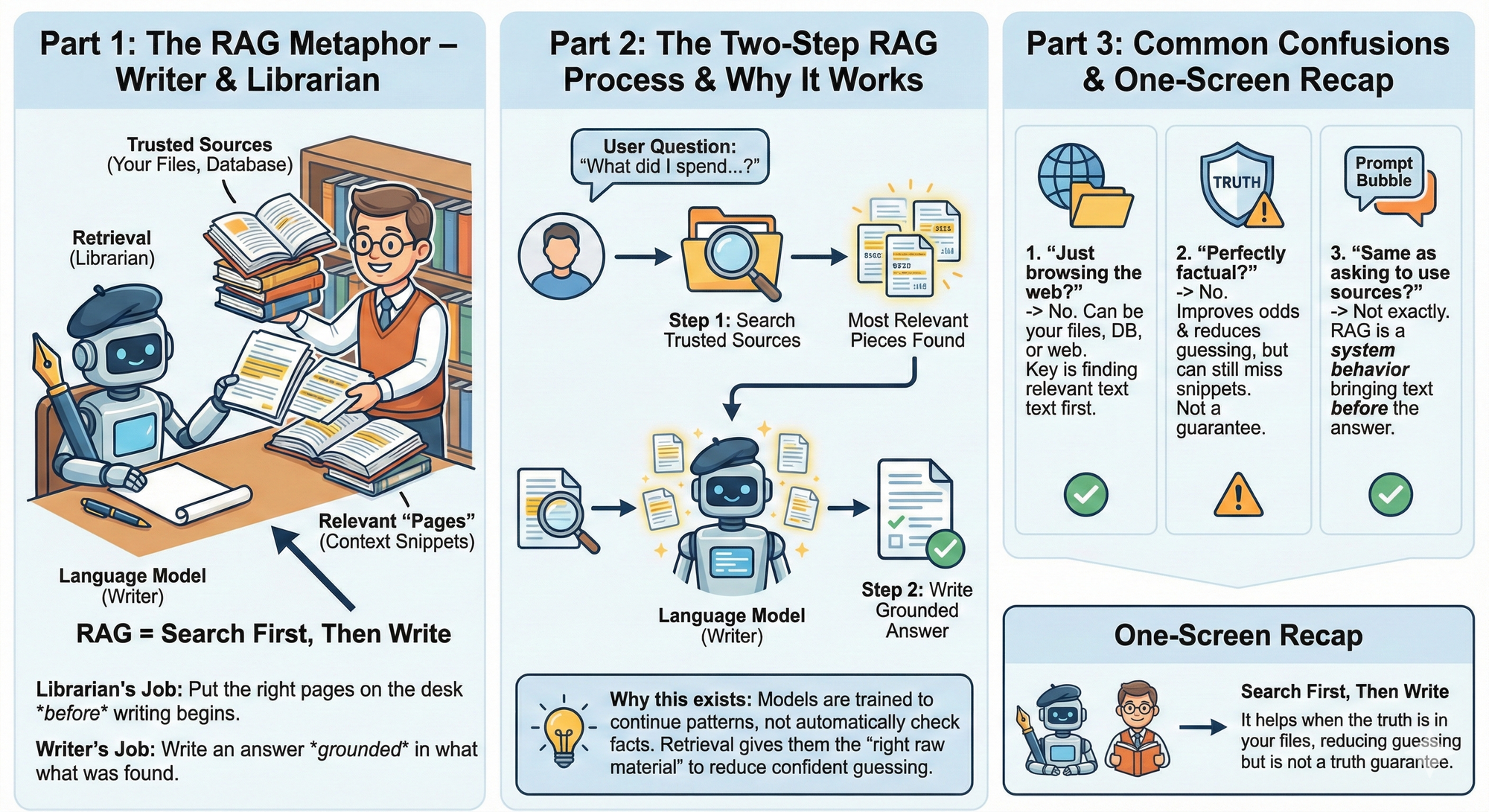
Retrieval-augmented generation is a way to improve an answer by doing two steps in order.
Step 1: Search for the most relevant pieces of information from a trusted source, like your documents.
Step 2: Give those pieces to the language model so it can write an answer that is grounded in what was found.
A simple way to picture it:
- The language model is a writer.
- Retrieval is a librarian.
- A writer can sound smart even when they do not have the right book open. A librarian’s job is to put the right pages on the desk before the writer begins.
Why this exists: A language model is trained to continue patterns in language. It is not automatically checking your files. It is not automatically verifying facts. Retrieval is how you give it the right raw material.
Common confusion 1: “Is retrieval just browsing the web?”Not necessarily. Retrieval can be over your own files, a database, a knowledge base, or the web. The key idea is the same: find relevant text first, then write.
Common confusion 2: “Does retrieval make it perfectly factual?”No. Retrieval helps, but it can still pull the wrong snippet or miss the best snippet. It improves your odds. It does not guarantee truth.
Common confusion 3: “Is this the same as asking the model to ‘use sources’?”Not exactly. Asking for sources is a prompt tactic. Retrieval is a system behavior that brings in the source text before the model answers.
Example 1: Subscription total from your Monthly Money Pack
Task context: You want a clean total of subscriptions this month. The truth is in your transaction export.
Why retrieval matters: Without retrieval, the model may guess or summarize loosely. With retrieval, it can quote the exact lines that show subscription charges.
Bad input: Please tell me what I spent on subscriptions this month.
Good input:
- I uploaded my Monthly Money Pack.
- Question: What did I spend on subscriptions in October?
- Use only the transactions you can find in my files.
- If the file does not show it, say you do not have enough information.
What improved and why: You forced the system to look for transaction lines first. That reduces confident guessing.
Example 2: Find the “why” behind a budget spike
Task context: Your dining category jumped. You want to know what caused it.
Why retrieval matters: The reason is usually a handful of specific transactions. Retrieval is how the system finds them fast.
Bad input: Why is my dining spending high?
Good input:
- I uploaded my Monthly Money Pack.
- Find the transactions related to dining.
- List the top three biggest dining charges and their dates.
- Then summarize what likely drove the increase using only those lines.
What improved and why: You asked for evidence first, then a summary second. That is retrieval-augmented generation in spirit.
One-screen recap
- Retrieval-augmented generation means search first, then write.
- The model is the writer. Retrieval is the librarian.
- It helps when the truth is in your files, not in the model’s memory.
- It reduces confident guessing, but it is not a truth guarantee.
Your 10-Minute Win
A step-by-step workflow you can use immediately
🕵️♂️Your 10-Minute Win: The "Invisibility Tax" Radar
If you budget well but still feel like money “randomly disappears,” it’s usually not random — it’s irregular expenses you agreed to without pricing in (birthdays, vet visits, renewals, travel weekends). Your calendar is basically a financial warning system you’re not using. In 10 minutes, you’ll turn the next 90 days into a clean list of upcoming “hidden commitments,” estimate the damage (often ~$400+), and create a simple weekly buffer so you stop getting blindsided.
The Workflow
1. Export Your Next 90 Days (2 Minutes)
Open your calendar (Google Calendar or Apple Calendar) on your phone or laptop and switch to Agenda/List view. Your goal is to capture only the next 90 days.
Choose the fastest option:
- Paste text: Copy your agenda items for the next 90 days into a note (even rough is fine).
- Upload screenshots: Take 2–4 screenshots of your agenda/list view that cover the next 90 days.
You’re not trying to be perfect — you’re giving ChatGPT enough signal to spot spending triggers.
2. Run the “Invisibility Tax” Scan in ChatGPT (4 Minutes)
Open ChatGPT and start a new chat. If you’re using screenshots, upload them first. Then copy/paste this prompt:
You are my “Invisibility Tax Radar.”
Goal: Scan my personal calendar for the next 90 days and identify events that likely create irregular expenses (“hidden commitments”) that are NOT in my monthly budget.
Input:
- My calendar for the next 90 days (pasted text OR screenshots I uploaded).
Rules:
1) Do NOT invent events. Use only what you can see in the calendar input.
2) Flag events that often trigger spending: birthdays/gifts, dinners/hosting, travel, school/kids, health/vet, home repairs, subscriptions/renewals, weddings/holidays, registrations.
3) For each flagged event, estimate cost using ONLY reasonable ranges:
- Low: $10–$40
- Medium: $40–$150
- High: $150–$500+
If unsure, mark “TBD” and ask me ONE clarifying question.
4) Output in this exact format:
A) Hidden Commitments Table (sorted by date)
Date | Event | Category | Cost Estimate (Low/Med/High or TBD) | Confidence (1–5) | “Do This Now” (one action)
B) Total Exposure Summary
- Count of flagged events:
- Total exposure estimate (range is fine):
- Biggest 2 categories driving cost:
- Weekly buffer suggestion (total exposure / weeks remaining):
C) Quick Fix Plan (3 bullets)
- One new budget line item I should add this month:
- One sinking fund I should start:
- One spending rule to prevent surprises:
Here is my calendar for the next 90 days:
[PASTE CALENDAR TEXT HERE]
(or: “Calendar screenshots uploaded.”)
Copy/Paste: "You are my “Invisibility Tax Radar.” … Here is my calendar for the next 90 days: [PASTE CALENDAR TEXT HERE] (or: “Calendar screenshots uploaded.”)"
3. Pressure-Test the Results (2 Minutes)
Don’t just accept the output — validate it quickly:
- Look at “Total Exposure Summary” first. That number is your “aha.” If it’s bigger than expected, good — you found the leak.
- Scan for false positives: If ChatGPT flagged something you already budget for (gym, rent, routine groceries), reply: “Remove these — they are already in my monthly budget: [LIST ITEMS]. Recalculate totals.”
- Resolve TBD items: Answer the 1–2 clarifying questions. This is where you convert “maybe” into “real.”
Your goal: a list you trust, not a perfect forecast.
4. Create Your Asset: The 90-Day Invisibility Tax Ledger (2 Minutes)
Turn the chat into something you’ll actually use:
Option A (fast): Copy the final Hidden Commitments Table into your Notes app titled: “Invisibility Tax Ledger — Next 90 Days”
Option B (cleaner): Ask ChatGPT: “Output the Hidden Commitments Table as CSV only (no commentary) so I can paste into Google Sheets.”
Then paste it into a new Google Sheet (cell A1).
Final line to add at the top of your note/sheet: Weekly Buffer Target: $___ / week (from the AI summary)
That’s your defensive move.
The Payoff
You now own a tangible asset: a 90-day Invisibility Tax Ledger — a dated, categorized list of upcoming spending triggers with a simple action next to each one. You also have a weekly buffer target that converts “surprises” into planned cash flow. Instead of getting hit with $400+ in random expenses, you’ll see them early and decide: cut, cap, delay, or fund them. This is what “budgeting” is supposed to feel like: calm and controlled.
Transparency & Notes
- Tools used: ChatGPT (Free / freemium accessible).
- Privacy: Remove sensitive info like full names, addresses, and account numbers before pasting or uploading.
- Limits: Free tiers may have usage limits and file upload limits; if uploads are unavailable, use copy/paste text from agenda view instead.
- Educational workflow — not financial advice.
Follow us on social media and share Neural Gains Weekly with your network to help grow our community of ‘AI doers’. You can also contact me directly at admin@mindovermoney.ai or connect with me on LinkedIn.