Volume 20: Escaping the Black Hole of Spam
Hey everyone!
The 2026 model race has started, and there are no signs of it slowing down. While the tools are getting faster, the real advantage comes from building smarter systems to control them.
🧭 Founder’s Corner: I break down how I used AI governance to fix the invisible technical debt sending my emails to spam.
🧠 AI Education: We continue our RAG series by clarifying the critical difference between simple keyword search and true meaning search.
✅ 10-Minute Win: Learn to spot if leadership is actually buying or quietly selling with a "Skin in the Game" analysis workflow.
Let’s dive in.
Missed a previous newsletter? No worries, you can find them on the Archive page. Don’t forget to check out the Prompt Library, where I give you templates to use in your AI journey.
Signals Over Noise
We scan the noise so you don’t have to — top 5 stories to keep you sharp
1) Anthropic Releases Claude Opus 4.6
Summary: Anthropic’s newest top-tier model has launched with a massive 1 million token context window and significant upgrades in coding and agentic tasks. It is designed to handle complex, long-running enterprise workflows and is now available on Microsoft Foundry and Claude.ai.
Why it matters: This pushes the "context window" boundaries, allowing AI to process book-length documents or massive codebases in a single prompt. For professionals, it means less manual data chopping and better performance on complicated, multi-step projects.
2) OpenAI Launches GPT-5.3 Codex
Summary: OpenAI’s latest model focuses specifically on "agent-style" development, running 25% faster and possessing the ability to use tools and operate computers to complete tasks. OpenAI revealed that earlier versions of the model were even used to help debug its own training run.
Why it matters: This signals a shift from AI as a "chatbot" to AI as a "coworker" that can navigate your computer to get things done. The speed increase and self-correction capabilities suggest a major leap in reliability for developers and technical professionals.
3) Google DeepMind Unveils AlphaGenome
Summary: DeepMind’s new AI tool can predict how small genetic mutations affect biological processes, analyzing up to 1 million DNA letters at a time. It significantly outperforms existing models in predicting disease risks and understanding complex gene regulation.
Why it matters: This is a massive leap for biology—moving AI from generating text to potentially unlocking the secrets of DNA. It gives researchers a powerful new lens to identify the root causes of genetic disorders faster than traditional wet-lab experiments.
4) Amazon Alexa Plus is Now Free for Prime Members
Summary: Amazon has rolled out its upgraded "Alexa Plus" AI to all U.S. Prime members at no extra cost, officially removing the waitlist. Powered by Amazon Nova and Anthropic models, the new assistant is more conversational, proactive, and capable of handling complex tasks like booking reservations. Why it matters: This brings advanced generative AI into millions of living rooms overnight, effectively for free. It sets a new standard for consumer value and puts immediate pressure on Apple and Google to upgrade their voice assistants to match this level of utility.
5) Claude Is a "Space to Think" (No Ads)
Summary: Anthropic has officially committed to keeping Claude ad-free, positioning the platform as a private "trusted tool for thought" rather than a content channel. They argue that advertising incentives would fundamentally corrupt the AI’s helpfulness and user trust.
Why it matters: As AI companies look for new revenue streams, Anthropic is betting strictly on subscriptions over eyeballs. This draws a clear line against ad-supported models, offering a distinct privacy-first alternative for users doing sensitive professional work.
Founder's Corner
Building Neural Gains Weekly forces me to learn in public. This is my first journey building out a website and publication from scratch, which has led to many lessons learned along the way. Using AI as a strategic partner helps me identify gaps and quickly build and implement a solution to solve a problem. And, as the models improve and become more powerful, I can harness that intelligence to close blind spots and flaws in my workflows that either I or previous models missed. This week, I want to share an example of this process, where I worked with Gemini 3 Pro to fix an issue that was quietly hurting engagement and growth.
The Problem
My website platform’s (Ghost) default signup flow relies on a double opt-in email. Secure? Yes. Easy? No. As a busy professional, I often trade infrastructure perfection for content creation. But when I looked at subscriber-level data, the reality was stark. High-intent potential subscribers were not completing the signup process and/or never opening the weekly newsletter. I created a test email account to better understand the pain points and found three glaring problems with the signup workflow:
- Invisible Instructions: Users didn't know a confirmation email was on its way.
- The Spam Trap: Confirmation emails were landing in Spam/Promotions and going unseen.
- The Dead End: Confirmed subscribers were missing the weekly newsletter because they never 'whitelisted' the domain and the newsletter landed in Spam/Promotions.
I was losing people before I ever had a chance to engage with them, with zero visibility into lost subscribers. This was an opportunity to leverage AI to help update my code base and deploy a permanent fix without jeopardizing the overall integrity of the site. One wrong line of code and the whole signup form breaks. Blindly pasting AI-generated code is a great way to destroy your production environment. Instead, I used a governance-first workflow to ensure we moved slowly and correctly.
Phase 1: The Code Audit
I did not start by asking for a solution. I started by feeding Gemini my existing code. I uploaded my cover.hbs file and asked it to explain how the current process worked within the existing code base. We needed to establish the "ground truth" of my specific theme before starting to make changes. This ensured that any solution we built would respect the existing architecture rather than fighting against it.
Phase 2: Strategy & Research
I treated Gemini as a consultant, not just a coder. I needed a solution that fixed the workflow without rewriting my entire theme. I started this process by clarifying a stringent set of rules to operate within: Always ask clarifying questions one at a time. Do not hallucinate; if you do not know the answer, say so. Be thorough and always fact check. Do not just agree with me. Push back to ensure the best output.
This framework allows for a consistent approach to solving a problem and clear guidelines for the partnership. Through a back-and-forth ideation, Gemini suggested the best path forward would be to create a redirect page that required minimal changes to the code base. Ghost’s limitations to change the subscription process were a major factor that drove us to this decision. A fact discovered through the research phase and only achievable through a governance-driven workflow. We didn't guess, we verified. This research phase prevented the technical debt that usually comes from hasty quick fixes.
Phase 3: The Fix
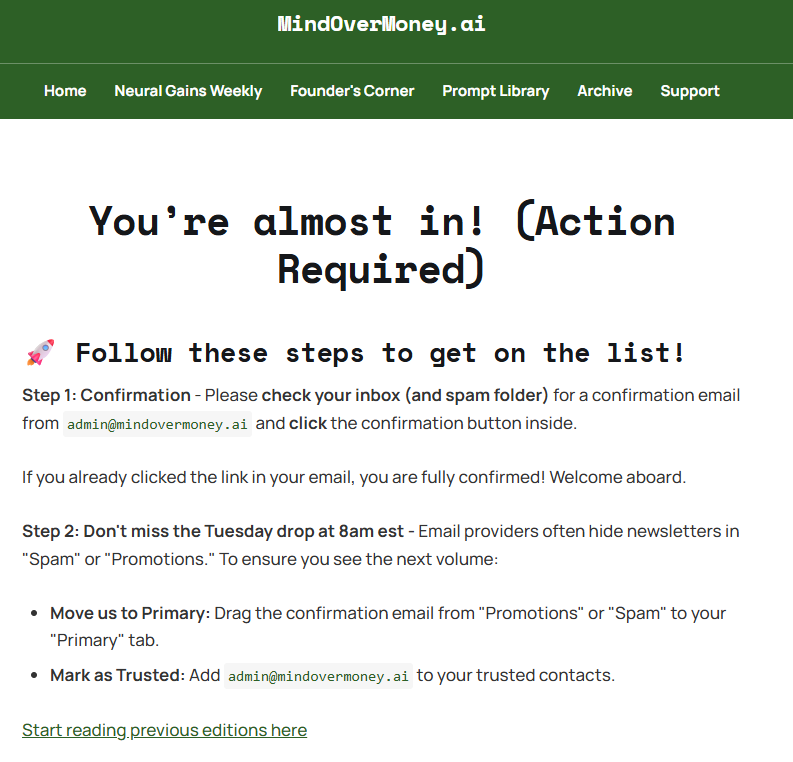
We built a redundant system to ensure every user sees the instructions they need. First, we added a frontend script that watches for a successful signup. The moment a user hits "Subscribe", the site automatically redirects them to a dedicated “Welcome" page with instructions to check their inbox. Second, we changed the Ghost settings to redirect users again after they click the confirmation link in their inbox. This redundancy ensures that even if they miss the first step, they land on the instructions page a second time.
Phase 4: The Infrastructure Check
Finally, we audited the plumbing. We found a mismatch between my subdomain and root domain that was flagging my emails as 'unverified' to Google. By fixing the SPF and DMARC records, we proved to email providers that I am who I say I am. This was the invisible barrier that no amount of good content could overcome.
The Result
This solves the visibility problem completely. Previously, a user would sign up and stay on the homepage, likely missing the confirmation message in their spam folder. Now, the workflow is impossible to miss. A user signs up, is immediately moved to a page that says "Check your spam folder," finds the newsletter to whitelist it, and is reminded again to add us to their contacts upon confirmation.
The Lesson
AI can be a powerful tool to help you solve complex problems in a way that wasn’t possible three years ago. It can act as a senior engineer to generate thousands of lines of code. It can research thousands of documents within a matter of minutes. It can bring solutions to the table when the answer feels impossible. But with any powerful system, it requires guidance and structure. You cannot just "prompt and pray." You have to govern the output, challenge the assumptions, and verify the work. That is how you build leverage without breaking the system.
AI Education for You
Part 2: RAG 101 — Keyword Search vs Meaning Search
Retrieval-augmented generation only works if retrieval works. That sounds obvious, but it is the whole game. If the system pulls the wrong text, the answer will still be wrong. So this week is about the most important question in retrieval. How does the system decide what is relevant?
Core lesson
There are two main ways search can work.
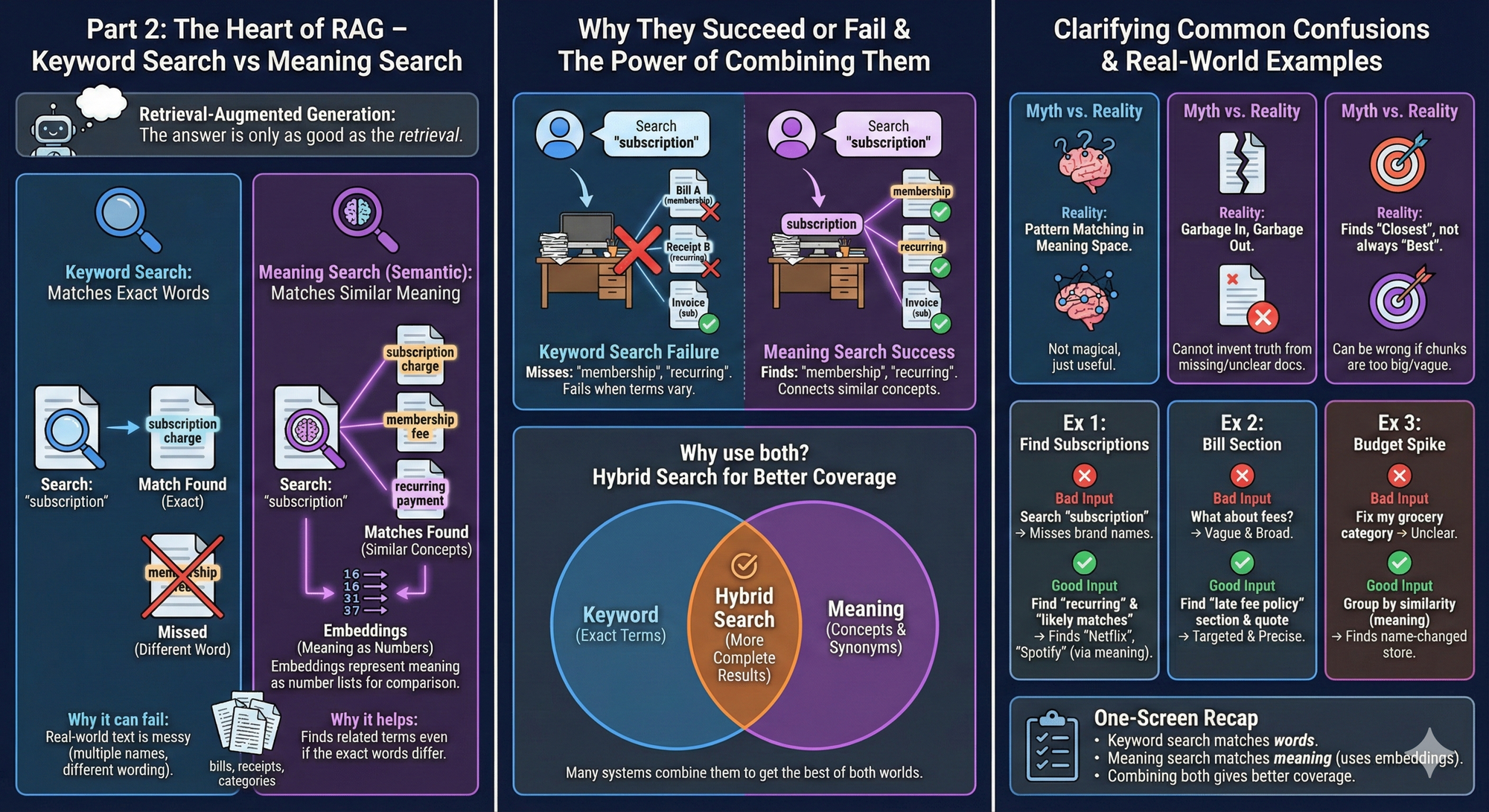
Keyword search: It looks for exact words or close matches.
Meaning search: It looks for similar meaning even when the words differ. This is often called semantic search.
Meaning search is usually powered by embeddings, which are number lists that represent meaning. Earlier you learned embeddings as “meaning as numbers.” In search, those meaning numbers let the system compare “how close” two pieces of text are.
Why keyword search can fail: Real life text is messy.
- merchants have multiple names
- bills use different wording
- categories are inconsistent
So exact word matching misses things.
Why meaning search can help: Meaning search can find “subscription charge” even if the line says “membership” or a brand name you forgot.
Why people often use both: Keyword search is great when you know the exact term. Meaning search is great when you do not. Many systems combine them to get more complete results.
Contrast and clarity
Common confusion 1: “Meaning search is mind reading.” No. It is pattern matching in a meaning space. It is useful, not magical.
Common confusion 2: “Meaning search replaces good documents.” No. If the documents are missing, outdated, or unclear, search cannot invent the truth.
Common confusion 3: “Meaning search always finds the best snippet.” Not always. It finds what seems closest. That can still be wrong if the chunks are too big or too vague.
Examples that land
Example 1: Find subscriptions even when names differ
Task context: You are trying to find recurring subscriptions in a transaction export.
Why search matters: Keyword search for “subscription” will miss brand names. Meaning search can still pull likely subscription lines.
Bad input: Search my transactions for subscriptions.
Good input:
- In my uploaded transaction export, find charges that look like recurring subscriptions.
- Do not rely on the word subscription.
- Return a short list of likely matches with merchant and amount.
What improved and why: You told the system what you mean, not just what word to match.
Example 2: Find the right bill section fast
Task context: A bill is long. You want the late fee policy.
Bad input: What does my bill say about fees?
Good input: In the uploaded bill PDF, find the section that describes late fees or payment penalties. Quote the exact lines that state the fee rule.
What improved and why: You narrowed the target. Retrieval works best with a clear target.
Example 3: Find a “why” behind a budget category
Task context: Your groceries category looks wrong because one store changed its name.
Bad input: Fix my grocery category.
Good input:
- Find transactions that belong in groceries, even if the merchant name changed
- Group similar merchants together by meaning.
- Then list which ones should be recategorized.
What improved and why: You asked for grouping by similarity, which is what meaning search is good at.
One-screen recap
- Keyword search matches words.
- Meaning search matches meaning.
- Meaning search usually uses embeddings to compare similarity.
- Many systems combine both methods for better coverage.
Your 10-Minute Win
A step-by-step workflow you can use immediately
🧑💼The "Skin in the Game" Check
Why this matters: Investing is a long game, and management behavior matters. Executives can say “we’re bullish” on calls… while quietly selling shares every month. This workflow helps you spot whether leadership is buying, holding, or cashing out—so you can sanity-check your conviction with real “skin in the game” evidence.
The Workflow
1. Pull the last 6 months of insider activity (2 Minutes)
Open a browser and pull insider transactions for a company of your choice using a Form 4 insider screener (the sites that summarize SEC Form 4 filings).
Do this:
- Search: “[TICKER] insider trading Form 4”
- Open a result that shows a table with insider transactions (CEO/CFO/Director, buy/sell, date, shares, price).
- Filter to Last 6 months (if available).
- Copy the rows for CEO/CFO/Chair/President (or just copy the whole table if that’s easier).
You’re gathering raw ingredients for Gemini to analyze.
2. Run the analysis in Gemini (4 Minutes)
Open Gemini and start a new chat. Paste the copied table text (or paste the page text if that’s what you have). Then copy/paste this prompt:
You are my “Skin in the Game” analyst.
Goal: Determine whether company leadership is meaningfully buying, holding, or selling shares — and whether the pattern is a red flag.
Inputs:
- Ticker: [TICKER]
- Insider transaction table text: [PASTE TABLE TEXT HERE]
Rules:
1) Use ONLY the pasted data. Do not invent transactions.
2) Treat different transaction types differently:
- “P” = purchase (strong signal)
- “S” = sale (could be signal or routine)
- “M” = option exercise (not a buy signal by itself)
- “F” = tax/withholding sale (usually less meaningful)
If codes aren’t shown, infer cautiously from the “Trade Type” column.
3) Focus on CEO, CFO, Chair, President, and Directors. Call out if the CEO is selling repeatedly.
4) Output in this exact format:
A) Executive Net Activity Table (last 6 months)
Name | Title | Buys (#) | Sells (#) | Net Shares | Net $ (if available) | Notes (1 line)
B) Pattern Read (plain English)
- What the pattern suggests (2–3 sentences)
- Biggest red flag (if any)
- Biggest “nothingburger” explanation (if any)
C) “Message vs Money” Check
If there are repeated CEO sells, write:
- “What they might say publicly”
- “What the transactions suggest”
(2 bullets each)
D) Skin-in-the-Game Score (Green / Yellow / Red)
Give one sentence for the score.
E) Investor Follow-Up (3 questions)
Write 3 questions I can use on an earnings call or in my own research to verify context (10b5-1 plan, compensation, diversification, etc.).
Now analyze:
Ticker: [TICKER]
Insider table text:
[PASTE TABLE TEXT HERE]
3. Interpret the results (2 Minutes)
This is the “don’t fool yourself” part. Look for these signals:
- Real bullish signal: CEO/CFO open-market buys (“P”)—especially multiple buys over time.
- Real warning pattern: CEO selling (“S”) repeatedly for months with no offsetting buys, especially if it’s a meaningful reduction in ownership.
- Common false alarm: Lots of “M” (option exercise) and “F” (tax withholding). Those often happen automatically and don’t always reflect confidence.
- Your “aha” moment: If the CEO has been selling steadily for 6 months while messaging confidence, that’s a disconnect worth noting (even if you still like the business).
If anything looks unclear, reply in Gemini: “Which transactions are most meaningful vs routine? Mark each row as Signal / Neutral / Noise and explain why.”
4. Create the asset: your “Skin in the Game One-Pager” (2 Minutes)
Ask Gemini for a clean, saveable summary you can reuse:
- Copy/paste this into Gemini: “Turn this into a one-page brief I can save. Format it as: (1) Score (Green/Yellow/Red) (2) 5-bullet summary (3) The executive net activity table (4) My next-step questions Keep it under 200 words.”
Then paste that one-pager into your Notes app or a Google Doc titled: “[TICKER] — Skin in the Game Check (Date)”
That’s your tangible asset.
The Payoff
In 10 minutes, you go from “I think leadership is aligned” to a concrete Skin in the Game One-Pager backed by insider transaction patterns. You also get a clear Green/Yellow/Red score and 3 follow-up questions to keep your thinking honest. This doesn’t tell you what to buy—but it does reduce the odds you get emotionally anchored to a story while insiders quietly head for the exits.
Transparency & Notes
- Tools used: Gemini (Free / freemium accessible).
- Privacy: Don’t paste personal account details, brokerage screenshots with balances, or full names of family members—stick to the ticker and the insider table.
- Limits: Free tiers may have usage limits. If Gemini blocks web lookups, this workflow still works because you’re pasting the insider table directly.
- Educational workflow — not financial advice.
Follow us on social media and share Neural Gains Weekly with your network to help grow our community of ‘AI doers’. You can also contact me directly at admin@mindovermoney.ai or connect with me on LinkedIn.