Volume 22: The Hallucination Tax
Hey everyone!
AI is showing up in more meetings, more decks, and more decisions than ever. That is not the problem. The problem is what happens when those outputs are wrong and no one catches it until it is too late.
This week is about building the habit of control before the cost shows up.
🧭 Founder's Corner: Why AI hallucinations are a workplace liability, and five practical guardrails to protect your credibility without slowing down your work.
🧠 AI Education: The final chapter of our RAG series, covering the three most common failure modes and a beginner checklist to diagnose what went wrong.
✅ 10-Minute Win: Use Gemini to build a curated 4-week learning syllabus with free YouTube and podcast picks, weekly deliverables, and self-quizzes built in.
Let's get into it.
Missed a previous newsletter? No worries, you can find them on the Archive page.
Signals Over Noise
We scan the noise so you don’t have to — top 5 stories to keep you sharp
1) Gemini 3.1 Pro: A smarter model for your most complex tasks
Summary: Google announced Gemini 3.1 Pro and says it’s rolling out across the Gemini app, NotebookLM, and developer offerings (Gemini API / Vertex AI), aimed at tougher “reasoning” work where a simple answer isn’t enough.
Why it matters: This is the “models getting smarter, not just chattier” trend—better reasoning is what turns AI into something you can trust for real decisions and complex work.
2) OpenClaw founder Steinberger joins OpenAI, open-source bot becomes foundation
Summary: Reuters reports that OpenClaw’s founder Peter Steinberger is joining OpenAI, while the OpenClaw project will continue as an open-source foundation supported by OpenAI.
Why it matters: This is the “agents” shift: AI isn’t just chatting—it’s starting to do things (email, check-ins, workflows), which raises both usefulness and security stakes fast.
3) Andrew Yang predicts AI could eliminate half of white-collar jobs
Summary: Andrew Yang argues AI could replace a large share of white-collar roles and ripple into local service jobs that depend on office work, while noting evidence so far suggests most layoffs aren’t primarily AI-driven yet.
Why it matters: This frames the real debate beginners should track: not “will AI take jobs?” but which tasks get automated first, and how quickly companies change how they hire and staff.
4) ‘Slow this thing down’: Sanders warns US has no clue about speed and scale of coming AI revolution
Summary: Bernie Sanders warns the U.S. is unprepared for rapid AI disruption and calls for urgent policy action—including a moratorium on expanding AI data centers—while lawmakers debate how to govern AI growth.
Why it matters: The next phase of AI is going to be shaped as much by power, water, and permitting (data centers) as by model quality—and politics is moving into that arena.
5) India to Add 20,000 GPUs Beyond Existing 38,000 to Strengthen National AI Infrastructure
Summary: India’s IT ministry says it will add 20,000 GPUs on top of its existing 38,000 and expects major investment tied to building national AI compute capacity and safety partnerships.
Why it matters: AI is becoming national infrastructure. Countries that can scale compute access (and govern it) will attract companies, talent, and model development—and everyone else will be downstream.
Founder's Corner
The Hallucination Tax
You walk into a leadership meeting confident. The deck is clean, the narrative is tight, and the numbers look solid. The room aligns and you leave with a green light.
Then you discover the stat that anchored your argument was invented.
That is the hallucination tax: the time you lose and the trust you burn when AI outputs sound certain but are wrong.
AI adoption is on the rise, not just in people’s personal lives but in the workplace. The Google and Ipsos “AI Works for America” poll found that 40% of U.S. employees now use AI at work. More importantly, the poll highlighted the impact of organizational support. When workers have both AI tools and formal guidance, they are 4.5 times more likely to become “AI Fluent,” defined as using AI at least weekly across eight or more distinct use cases. We’re entering a creativity era where workers can harness AI to push the boundaries of what’s possible in their roles.
But what’s the hidden cost of increased AI use? The answer: hallucinations. Large language models generate text by predicting the next word based on patterns in training data, not by cross-checking facts. Hallucinations are confident-sounding statements that are false, outdated, or unsupported by evidence. Even proficient AI users can’t blindly trust the output. According to a Rev.com study, “heavy” AI users are 3x more likely to experience frequent hallucinations and 14x more likely to double-check the AI’s work than casual users.
What Hallucinations Cost at Work
Here’s what this looks like at work. Imagine outsourcing research and data collection to an AI assistant for a high-stakes leadership meeting. You’ve spent hours preparing the materials and rehearsing your pitch. You’re confident and prepared, especially since AI saved you at least four hours. The presentation goes well, and you leave with full alignment from the steering committee on next steps. As you follow up and start building financial projections, you make an alarming discovery. The AI research that supported your business case is littered with errors. Stats were made up, data was outdated, and quotes were fabricated. In the corporate world, a hallucination isn’t a funny quirk. It’s a bad financial model, a lost client, or a compromised decision.
And the costs are already showing up inside companies. In a Zapier survey of 1,100 enterprise AI users conducted in November 2025, respondents reported spending an average of 4.5 hours per week cleaning up AI output. In the same survey, 74% said low-quality AI output led to at least one negative consequence at work. Hallucinations aren’t just an annoyance; they’re a corporate liability and a drag on productivity.
I’ve felt this firsthand. Across 22 issues of Neural Gains Weekly, I’ve caught dozens of hallucinations that had to be corrected before publishing. It costs time and forces me to put guardrails in place to prevent hallucinations. Give AI too much freedom, and you pay the price hunting for errors in the output. Add too many restrictions, and you jeopardize the output you actually want. That constant push and pull led me to develop practical guardrails that prevent hallucinations without sacrificing creativity. Here are five practical guardrails to reduce hallucinations and protect your time savings from rework.
Five Guardrails for Reliable AI Output
- Remove ambiguity from your prompts
Ambiguous questions give LLMs room to invent details. Your role is to provide what the AI needs to know and why it matters. Context and structure help the AI stay on task and produce a more factual output.
- Make the model clarify before it writes
One of my favorite workflows is an interview-style back-and-forth to surface the full intent of the request. You can add this step anywhere in your workflow to confirm the AI understands the task and has the context it needs. I like to build this directly into the prompt so it becomes part of the process the AI must follow. For example, add a line at the end of your prompt that requires the AI to ask clarifying questions one at a time before it starts.
- Ground the model in a source of truth
This is one of the easiest ways to reduce hallucinations, especially at work. LLMs are trained on internet data and use that training to generate responses to your prompt. This can be detrimental for enterprise work, but grounding techniques like retrieval-augmented generation (RAG) connect a model to a specific database so it can pull relevant documents and ground its responses. Simply put, give your AI specific documents, websites, databases, or SOPs, and tell it to use only those sources.
- Require citations and uncertainty
I used to think citations were for term papers, not your day job, but they’ve become an important governance lever in AI workflows. Best practice is to require the model to provide citations and direct links to its sources. This makes it easy to quickly fact-check a stat or quote and spot errors in the output. Another guardrail is to require the model to say when it doesn’t know. Add this line to your prompt: “If the answer is not explicitly supported by the provided sources, reply: ‘I do not have enough information to answer.’”
- Use a second model to fact-check the output
Two fact-checkers are better than one. Copy and paste your full chat into another model and ask it to review the output for errors. Use the first two guardrails so the model understands its role as a fact-checker and follows a clear process.
Great outputs require great inputs, clear boundaries, and tight collaboration. AI models will keep improving, unlocking more opportunities for professionals to level up their work. But AI can’t operate in a vacuum. You need to take control and steer it in the right direction. The professionals who win in this era won’t be the ones who use AI the fastest. They’ll be the ones who know how to control it, ground it, and verify it so their work stays credible.
AI Education for You
Part 4: RAG 101 — Making Retrieval Work
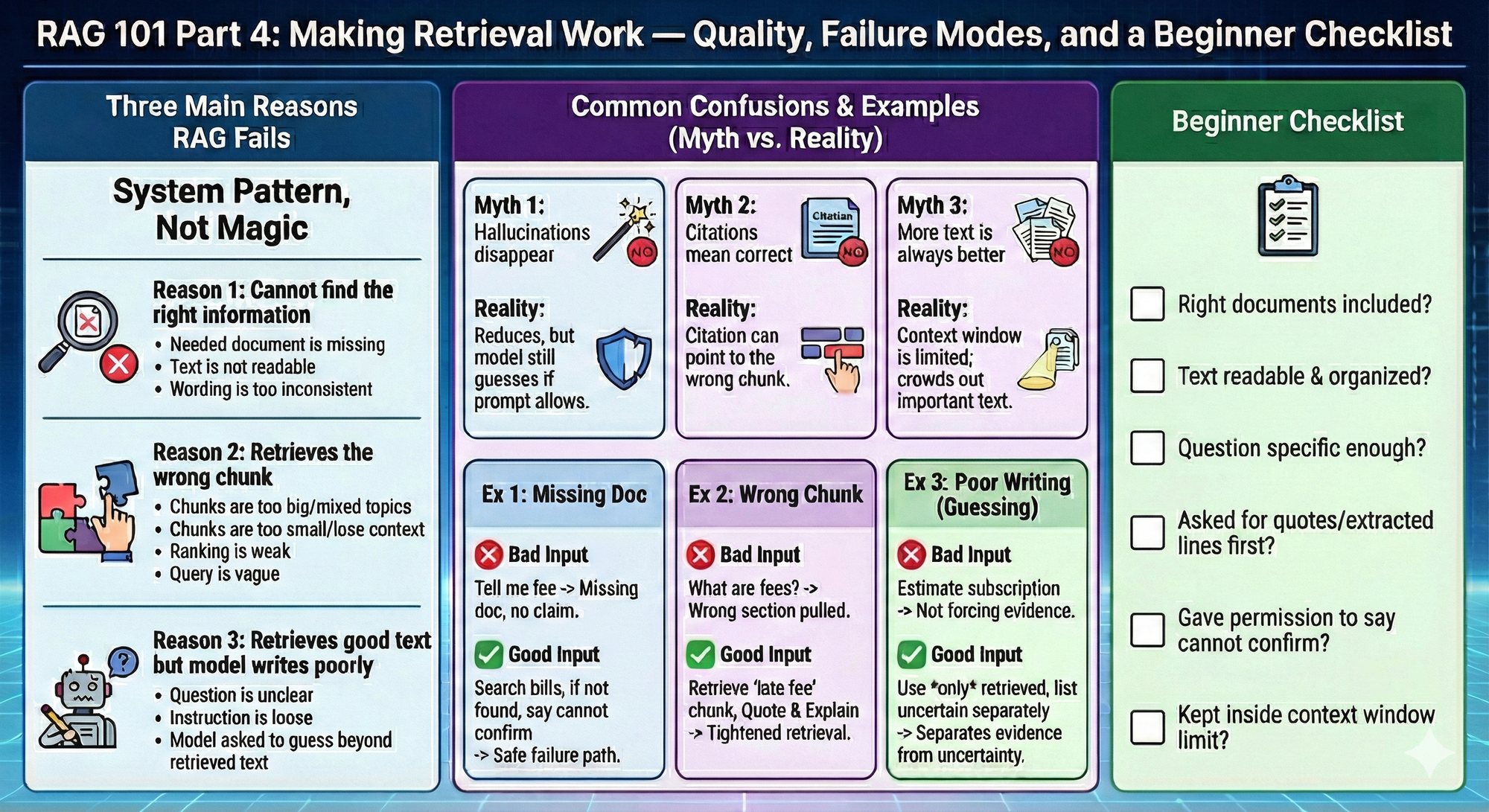
Retrieval-augmented generation is not a magic wand. It is a system pattern. When it works, it feels like the model “finally got smarter.” When it fails, it usually fails in predictable ways. This final part gives you the beginner mental checklist to recognize what went wrong.
Retrieval-augmented generation fails for three main reasons.
Reason 1: The system cannot find the right information
This happens when:
- the needed document is missing
- the text is not readable
- the wording is too inconsistent
Reason 2: The system retrieves the wrong chunk
This happens when:
- chunks are too big and contain mixed topics
- chunks are too small and lose context
- ranking is weak
- the query is vague
Reason 3: The system retrieves good text but the model still writes poorly
This happens when:
- the question is unclear
- the instruction is loose
- the model is asked to guess beyond the retrieved text
Common confusion 1: “If retrieval is on, hallucinations disappear.”
No. Retrieval reduces hallucinations when the relevant text is found and used. The model can still guess if the prompt allows it.
Common confusion 2: “Citations mean the answer is correct.”
Citations are a good sign, but a citation can still point to the wrong chunk.
Common confusion 3: “More retrieved text is always better.”
Too much text can crowd out the important text. The context window is limited.
Examples that land
Example 1: The answer is missing because the document is missing
Task context: You ask about a fee, but the bill document was not included.
Bad input: Tell me if I have a late fee.
Good input: Search my uploaded bills for late fees. If you cannot find any bill that mentions it, say you cannot confirm.
What improved and why: You created a safe failure path. No document means no claim.
Example 2: The answer is wrong because the wrong chunk was retrieved
Task context: A bill has multiple fee sections and the wrong one is pulled.
Bad input: What are my fees?
Good input: Retrieve the chunk that contains the words late fee or penalty fee. Quote the lines. Then explain those specific lines.
What improved and why: You tightened retrieval toward the correct section.
Example 3: The answer is sloppy because the instructions allow guessing
Task context: You want subscription totals, but you did not force evidence.
Bad input: Estimate what I spend on subscriptions.
Good input: Use only the subscription transactions you retrieve from my export. If you are unsure about a charge, list it separately as uncertain.
What improved and why: You pushed the model to separate evidence from uncertainty.
Beginner checklist
Use this every time retrieval feels off.
- Do I have the right documents included?
- Is the text readable and organized?
- Is my question specific enough?
- Did I ask for quotes or extracted lines before conclusions?
- Did I give the model permission to say it cannot confirm?
- Did I keep the task inside the context window limit?
Your 10-Minute Win
A step-by-step workflow you can use immediately
🎓The “Skill” Syllabus
Learning a new skill online is a trap: endless “guru” content, random TikToks, and advice that’s either outdated or trying to sell you something. In 10 minutes, you’ll force Gemini to build you a curated 4-week learning path using high-quality, free YouTube channels + podcasts—with a clear weekly plan and the exact episodes/videos to start with. You walk away with a syllabus you can actually follow.
The Workflow
1. Pick the skill + your goal (2 Minutes)
Write one line: Skill + outcome + timeframe. Example: “Rental Property Investing — learn enough in 4 weeks to evaluate my first deal without getting scammed.”
2. Generate your 4-week syllabus in Gemini (4 Minutes)
Open the Gemini app (web or mobile). Paste this prompt:
"You are my no-hype curriculum designer. Build me a 4-week learning syllabus for: [SKILL].
My goal: [WHAT I want to be able to do in 4 weeks]My current level: [total beginner / some basics / intermediate] Time available: [X minutes/day or X hours/week]
Hard requirements (must follow):
- Use ONLY free sources.
- Source types allowed: YouTube channels/playlists/videos and podcast episodes.
- Prioritize credible practitioners + institutions (examples: university channels, reputable industry pros, major publishers, recognized experts). Avoid “get rich quick,” hype, or anyone selling a course as the main angle.
- Each week must include:
- Weekly Focus (1 sentence)
- 3–5 YouTube picks (channel + exact video/playlist title + why it’s worth watching)
- 2–3 podcast picks (show + episode title + why it’s worth listening)
- Weekly deliverable (a tangible output I produce—checklist, template, one-page summary, decision rubric, etc.)
- 10-question self-quiz (to prove I actually learned it)
- Output in a clean table: Week | Focus | YouTube (3–5) | Podcasts (2–3) | Deliverable | Quiz
Quality control:
- If you’re unsure a source is credible, exclude it.
- Prefer sources with strong track records (clear explanations, evidence-based, not clickbait).
Start now. Ask me only 2 clarification questions max if absolutely needed—otherwise proceed with reasonable assumptions."
3. Do a 60-second credibility sniff test (2 Minutes)
Scan Gemini’s picks and look for red flags:
- Too much selling (every video funnels to a paid course)
- No receipts (no data, no real examples, no references)
- Hype language (“secret method,” “guaranteed,” “financial freedom fast”)
If you spot any, reply in Gemini: “Replace anything salesy/hype with more credible sources. Keep the same weekly structure.”
4. Lock the asset + make it real (2 Minutes)
Turn it into something you’ll actually use:
- Copy the table into Google Docs / Notion / Notes titled: [Skill] — 4-Week Syllabus (Start: ____ )
- Add 4 calendar reminders (one per week) like: “Week 1: [Skill] — Complete deliverable + quiz”
The Payoff
You now own a clean 4-week syllabus with: (1) a weekly plan, (2) specific free videos and podcast episodes, (3) a weekly deliverable that proves progress, and (4) quizzes to keep you honest. You’re no longer “watching content.” You’re running a structured learning program.
Transparency & Notes
- Tools used: Gemini (free tier available). Gemini can summarize and help analyze YouTube content via Google’s ecosystem features (availability can vary by region/feature rollout).
- Privacy: Remove sensitive info (names, account numbers, private addresses) before pasting anything into AI.
- Limits: If a YouTube video has weak/no captions/transcript, summarization quality can drop.
- Educational workflow — not financial advice.
Follow us on social media and share Neural Gains Weekly with your network to help grow our community of ‘AI doers’. You can also contact me directly at admin@mindovermoney.ai or connect with me on LinkedIn.